• Board
    • Find a School
    • Contact Us
    • Site Map
  • Students
    • Edsby
    • Office 365
    • Virtual Library
    • LMS
    • Clever
  • Parents
    • Parent Portal
    • Bus Delays/Cancellations
    • School Cash Online

Northern Secondary School

  • About Us
    • Principal’s Message
    • Code of Conduct
  • Academics
    • Library
  • Extra-Curriculars
    • Clubs
    • Sports
  • Forms & Newsletters
    • Forms
    • Newsletters
  • Staff
  • Upcoming Events
  • Edsby
    • Edsby – Parents
    • Edsby – Students
  • Parents

Edsby – Parent Login

Edsby for parents

Welcome to the Edsby portal where you will find information, tools and resources that engage you in your child's learning. 

The Edsby learning platform will allow you to:

  • View course activity and updates
  • Access assessment information
  • Communicate with teachers
  • View scheduled events & due dates
  • View attendance information

Where to look?

When you login, you will see your child's classes listed:
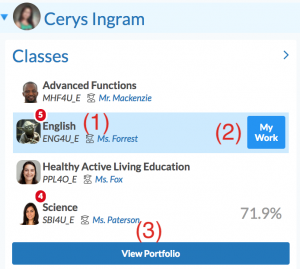
  • Clicking on the course code (1) takes you into the class to view class activity
  • Clicking on the "My Work" (2) button displays work associated with your child
  • See artefacts in your child's portfolio by clicking "View Portfolio" (3)
  • The recent activity area will display the latest updates to the activity feeds in your child's classes


Account Setup:

Before logging in you will receive an e-mail invite to setup your Edsby account.
If you didn't receive the e-mail please contact the school office.

Click here to learn about setting up your parent account.


Login Instructions

Login Instructions:

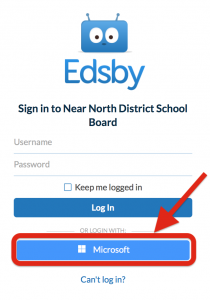
1. Click the Login button above

2. Select "Sign in with Microsoft"

3. Sign in with the username and password you setup for Edsby

(If you did not receive an e-mail invite to setup your Edsby account please contact the school office)

Download the login instructions here:  Edsby Parent Login Instructions

   
App Login Instructions

1. Download the Edsby app on android or iOS.

2. When launching the app, enter "nndsb" in the xyz area (See below):

3. Proceed with steps 2 and 3 above.

Setting Notifications:
Edsby Notifications: You can set notifications, including mobile notifications to stay up-to-date on what's going on in your child's classes. Notifications can be set in the browser or in the app. Click here to view the steps required to set notifications in Edsby:  Edsby Notifications
Parent Support:

Need support?

Access tutorial videos and other support resources here:
Edsby Parent Support

  • Code of Conduct
  • Forms
  • Newsletters
  • Contact Us


Copyright © 2026 · Near North District School Board